Simple seo tips for beginners how to optimize your website for seo in seconds

SEO (Search Engine Optimization) isn’t magic—it’s a series of small steps that help your website rank higher on Google and other search engines. If you’re just starting out, here are the essential, lightning-fast tips anyone can apply to boost their site’s visibility.
1. Nail Your Keywords—But Keep It Natural
Use keyword research tools (Google Keyword Planner, Ubersuggest, Answer the Public) to discover what people are searching for.
Choose words and phrases that fit your audience and topic—the more specific, the easier to rank.
Place your main keyword in the title, first paragraph, headings, and meta description—but don’t stuff. Write for humans first.
2. Write Good Titles and Meta Descriptions
Your title is the first thing searchers see—make it clear, relevant, and natural.
Meta description should be a one-line summary that encourages people to click. Use your keyword, but make it sound inviting.
Example: “Simple SEO Tips for Beginners: Easy Ways to Boost Your Website”.
3. Structure Your Content
Use headings (H1, H2, H3) to organize your information. Search engines (and real people) love clear sections.
Include keywords naturally in at least some subheadings—this makes your site easier to skim and improves rankings.
4. Make It Mobile-Friendly
Choose a responsive website design. Most searches happen on mobile phones now.
A mobile-ready site loads quickly and looks great on every device.
5. Speed Up Your Website
Fast pages rank better—compress images, eliminate unnecessary plugins, and use reliable hosting.
Check your site speed using free tools like Google PageSpeed Insights.
Aim for under 2 seconds load time.
6. Use Alt-Text on All Images
Add alt-text to every image—describe what’s in the image using your keyword where it fits.
This helps Google understand your visuals and improves search visibility.
7. Internal Linking
Link to other helpful pages within your website—this keeps visitors engaged and spreads SEO value across your site.
Use clear, descriptive anchor text (“See our beginner SEO guide” instead of “click here”).
8. Create Helpful Content
Build trust with high-quality, easy-to-read content that answers actual search questions.
Break text into short paragraphs, lists, or tables for easy reading.
Stay authentic—write for real people, not robots.
9. Claim Your Google Business Profile (Local SEO Tip)
If you run a local business, set up Google My Business. Update your address, hours, and photos.
Reviews and business info help you rank better for “near me” searches.
10. Keep Your Information Fresh
Update old content with new facts, images, or keywords.
Regular updates signal to Google that your website is valuable and active.
Pro SEO Tip: Answer Questions Directly
Answer specific questions (“How do I improve my website’s SEO?”) in simple, clear language to get picked for Google’s featured snippets (the answer boxes on top of search results).
Add a short FAQ section to your posts for even better visibility.
Quick SEO Checklist for Beginners
Choose and naturally use your main keyword
Write strong titles and meta descriptions
Organize content with headings and short paragraphs
Use alt text for all images
Speed up website loading
Make your site mobile-friendly
Link to other relevant pages
Claim Google Business Profile (if applicable)
Update your content regularly
Basics of SEO in Digital Marketing ?
SEO stands for Search Engine Optimization. It’s the process of improving your website’s visibility in search engines like Google, Bing, or Yahoo so more people can find you online. A well-optimized website attracts organic (free) traffic, builds trust with visitors, and helps grow your business faster.
Types of SEO in Digital Marketing ?
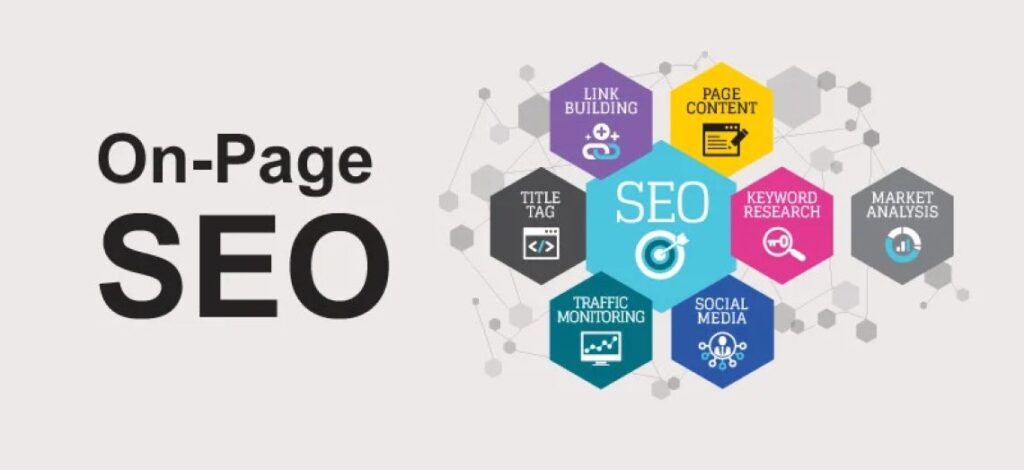
On-Page SEO
– Focuses on optimizing individual pages on your website.
– Includes tactics like using target keywords, writing helpful content, crafting SEO-friendly titles, meta descriptions, image alt-text, proper URL structure, and internal linking.
– Goal: Make each page relevant, readable, and easy for Google and your visitors to understand.
Off-Page SEO
– Refers to activities you do outside your website to boost its authority and popularity.
– The main tactic is building backlinks—getting other reputable sites to link to your site.
– Social sharing and online mentions also help signal trust to search engines.
Technical SEO
– Ensures search engines can crawl, index, and understand your website efficiently.
– Key tactics include fast site speed, mobile-friendly design, HTTPS security, XML sitemaps, fixing broken links, and improving site architecture.
– A technically sound site gets more visibility and fewer ranking issues.
Local SEO
– Targets audiences in a specific geographic location.
– Essential for small businesses that serve local customers, like restaurants, clinics, or shops.
– Tactics include Google My Business listings, local citations, location-based keywords, and customer reviews.
Content SEO
– Involves creating unique, high-quality content—blogs, guides, graphics, or videos—that educate or solve problems.
– Well-structured, keyword-rich content is key to ranking and engaging your audience.
E-commerce SEO
– Specialized SEO for online stores to attract shoppers and boost sales.
– Product page optimization, fast checkout, and descriptive content are vital.
Video & Image SEO
– Optimizes visual media so your images and videos rank better in search results or YouTube.
– Includes descriptive file names, alt-text, video transcripts, and rich media content.
International & Voice SEO
– International SEO targets audiences in different countries/languages, using local domains and translations.
– Voice SEO is about optimizing for questions and commands spoken into voice assistants like Siri or Alexa.
Simple SEO Tips for Beginners: How to Optimize Your Website for SEO in Seconds
Feeling lost? Start with these actionable, fast tips to upgrade your website’s SEO—even if you’re brand new. These are simple, effective, and can be done in minutes.
1. Choose Relevant Keywords
– Use free tools (Google Keyword Planner, Ubersuggest) to find what people search for.
– Pick long-tail keywords (4+ words)—these are easier to rank for and attract targeted traffic.
2. Write Unique, Helpful Content
– Answer real questions your audience asks. Use simple language, short sentences, and break info into easy sections.
– Avoid copying; always create original, valuable content.
3. Optimize Page Titles and Meta Descriptions
– Each page should have a descriptive, keyword-rich title (under 60 characters).
– Write a concise meta description—this shows up in Google results and should entice clicks.
4. Improve Website Speed
– Use free tools like Google PageSpeed Insights to check your site speed.
– Compress images, reduce plugins, and use reliable hosting.
5. Make Your Site Mobile-Friendly
– Most searches happen on phones.
– Choose a responsive site design so your site looks great anywhere.
6. Add Image Alt Text
– Every image should have a short, descriptive alt tag that includes your keyword.
– This helps search engines and visually impaired users.
7. Use Internal Linking
– Link your pages together using helpful anchor text.
– This helps visitors navigate and spreads SEO value.
8. Set Up Google My Business (For Local SEO)
– Claim your free listing, add accurate details, photos, and request reviews.
– Your business will show up in local search and maps.
9. Get Backlinks (Off-Page SEO)
– Reach out to relevant blogs or businesses and ask for a link to your content.
– Write guest posts or share your resources on social channels.
10. Keep Updating Your Content
– Refresh older posts with new info or keywords.
– Search engines reward fresh, updated content.
Quick Checklist for Superfast SEO Optimization
– Select the target keyword for each page
– Include it in the title, first paragraph, and headings
– Use alt text for all images
– Make sure your site loads in under 2 seconds
– Write a snappy meta description
– Add interlinks between related articles
– Test mobile-friendliness
– Submit a sitemap to Google Search Console
Conclusion
SEO is the backbone of successful digital marketing. Understand the types, use quick optimization steps, and create content that puts your audience first. Even if you start small, these SEO basics will help your site grow and rank in 2025 and beyond

Brand Uplift is a digital marketing agency focused on boosting your online presence, generating quality leads, and increasing ROI.
Useful Links
Contact Us
WZ- 79 Basai Dara Pur New Delhi - 110015
+91- 7827867828
+91 92892 70915
BrandUpliftDigitalMarketing@gmail.com
Copyright 2025, BRAND UPLIFT. All Rights Reserved.